
The ultimate ChatGPT app for SEO

Audit your website, search keywords data, and find organic traffic and backlinks insights directly inside ChatGPT.

Features

Powerful SEO tools in ChatGPT

Audit your website

Audit your website

Get comprehensive SEO audits with real-time crawling. Analyze on-page issues, technical SEO problems, domain health, and backlink profiles. Receive prioritized recommendations with severity ratings to improve your site's search performance.
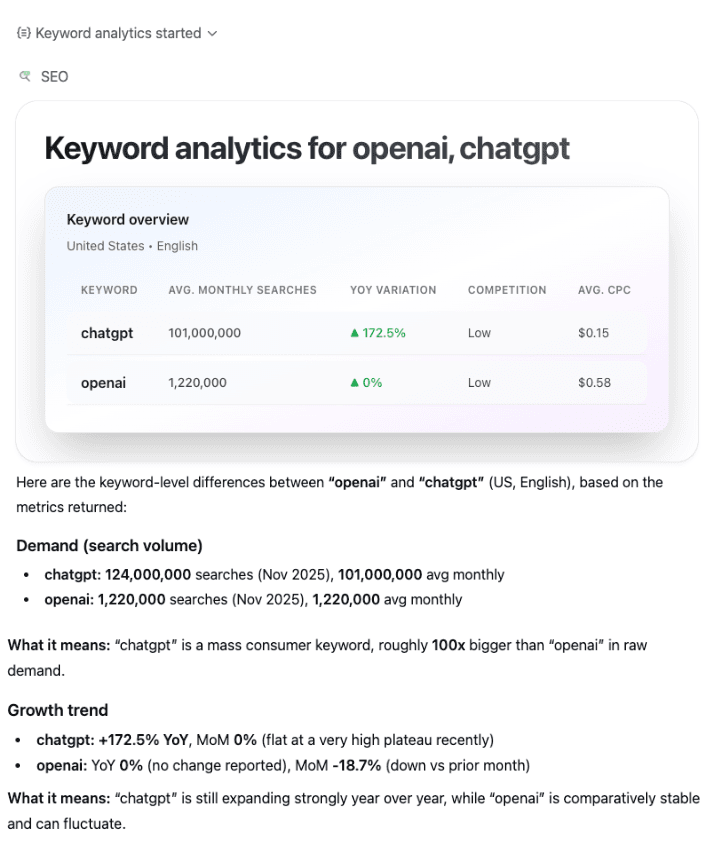
Search keywords data

Search keywords data

Analyze keyword search volumes, competition levels, and historical trends. Compare multiple keywords side-by-side, track month-over-month and year-over-year changes, and get CPC estimates to make data-driven SEO decisions.
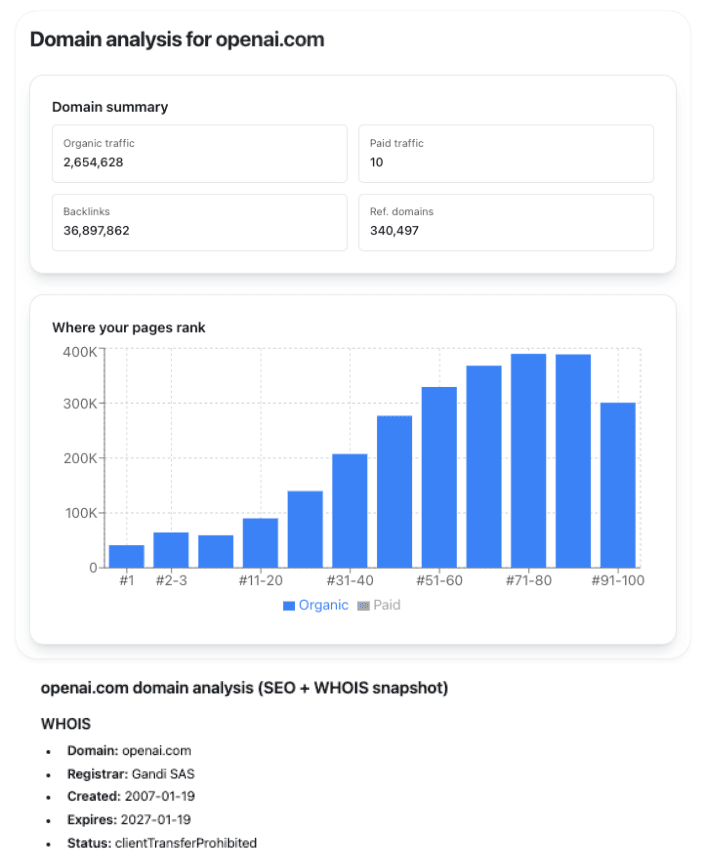
Find organic traffic and backlinks

Find organic traffic and backlinks

Discover organic search performance metrics for any domain. Get insights on referring domains, backlink counts, domain authority, traffic estimates, and position distributions. Perfect for competitive analysis and benchmarking.

how to install

How to install Seo GPT

🧩 Step 1: Open “Apps & Connectors”

🧩 Step 1: Open “Apps & Connectors”

Go to Settings → Apps & Connectors. This page lists all apps currently enabled (for example Ahrefs, Booking.com, Canva, GitHub, Seo GPT, etc.). Click the “Create” button in the top-right corner to add a new custom connector.

⚙️ Step 2: Choose the App to Add

⚙️ Step 2: Choose the App to Add

After clicking Create, a gallery of available integrations opens — services like Google Drive, Notion, Slack, Teams, and more. At the bottom of this view, click “Advanced settings” to open the area where you can manually add a developer connector.

đź§  Step 3: Create the Developer Connector

đź§  Step 3: Create the Developer Connector

A form titled “New Connector (BETA)” appears. Fill it in as follows: Name: Seo GPT. Description (optional): "A ChatGPT app to audit your website and improve your SEO." MCP Server URL: https://chatgptseo.app/mcp. Authentication: Select No authentication. Then tick “I trust this application” and click Create.

📊 Step 4: Use the Connector in Chat

📊 Step 4: Use the Connector in Chat

Once created, the new app appears in your message composer. Open the “+” menu (paperclip icon) → Add sources / tools, then select Seo GPT (DEV). You can now type prompts such as: “Audit the SEO of example.com” or “Search keyword data for 'digital marketing'” or “Show me backlinks for competitor.com”. Seo GPT will provide comprehensive SEO insights directly within ChatGPT.

Frequently Asked Questions

Can’t find the answer you’re looking for? Don’t hesitate to get in touch with our customer support team.